
PET#
- class deepinv.physics.PET(img_size, voxel_size=(2, 2, 2), fwhm_data_mm=4.0, scanner=None, radial_trim=3, gain=1.0, normalize=False, normalize_counts=False, device='cpu', background=None, attenuation=None, **kwargs)[source]#
Bases:
LinearPhysicsNon time-of-flight Positron emission tomography (PET) physics model.
This operator relies on the
parallelprojlibrary by Schramm and Thielemans[1].The PET forward model is defined as
\[y \sim \gamma \mathcal{P}\left(\frac{c \circ H(g*x) + b}{\gamma}\right)\]where \(H \in \mathbb{R}_{+}^{m \times n}\) is the projection operator, \(g \in \mathbb{R}_{+}^{n}\) is a Gaussian blur kernel, \(x\in\mathbb{R}_{+}^{n}\) is the emission image, \(b \in \mathbb{R}_{+}^{m}\) is the (expected) background, \(\mathcal{P}\) denotes Poisson noise with gain \(\gamma > 0\), \(c=\exp(-H\mu)\in \mathbb{R}_{+}^{m}\) is an (optional) attenuation term with \(\mu \in \mathbb{R}_{+}^{n}\) an attenuation map (typically obtained through an auxiliary CT scan).
The operator can be used on 2D images or 3D volumes.
The operator relies on parameters
backgroundandattenuationthat can be updated through thephysics.updatemethod or when evaluatingphysics.Aorphysics.A_adjoint.Note
This operator requires the
parallelprojpackage to be installed. This in turn requires installing deepinv via pixi or conda, but not pypi/uv (asparallelprojis not currently available on pypi).If you are working on a conda environment, you can install
parallelprojasconda install -c conda-forge parallelproj
If you are working on a pixi installation, simply do
pixi install -e full
which installs all optional dependencies.
Check the
parallelprojdocumentation for more details: https://parallelproj.readthedocs.io/en/stable/.Note
This operator currently only supports sinogram non-ToF data. To use this operator with listmode data and/or ToF data, you can easily swap out the projector
self.projfor the appropriate listmode or ToF projector. Seeparallelprojdocs for more details.- Parameters:
img_size (tuple) – shape of the input 2D
(H, W)or 3D volumes(D, H, W).voxel_size (tuple) – voxel size in mm. Default is 2 x 2 x 2 mm.
fwhm_data_mm (float) – full width at half maximum (FWHM) of the Gaussian blur \(g\). It has a crucial impact on the maximum achievable resolution, which is typically a fraction of the FWHM.
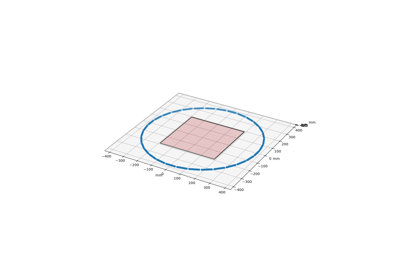
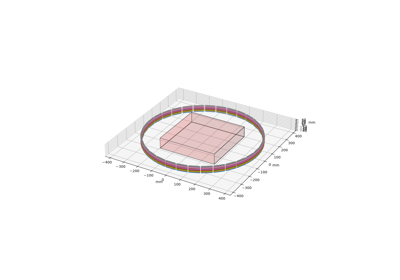
scanner (None, parallelproj.pet_scanners.ModularizedPETScannerGeometry) – Scanner configuration. If None, a default demo scanner from parallelproj is used.
radial_trim (int) – radial trim of rays on the sides of the volume to improve efficiency.
gain (float) – gain factor \(\gamma\) for the Poisson noise model.
normalize (bool) – If
Truethe forward operator is normalized such that \(\|A\|=1\).normalize_counts (bool) – If
Falsethe \(\gamma\) normalization term in front of the Poisson noise is removed, so that the measurements \(y\) are true integer counts.device (str | torch.device) – device to run the computations on, e.g.
"cpu"or"cuda"background (torch.Tensor) – background sinogram \(b\), i.e. the expected number of background events in each LOR, with shape
(num_lors,)attenuation (torch.Tensor) – attenuation map. Can be provided either in image space as \(\mu\) (linear attenuation coefficients, shape
(H,W)for 2D or(D,H,W)for 3D — typically from an auxiliary CT scan), or in sinogram/projection space as \(c=\exp(-H\mu)\). The space is inferred automatically by comparing the spatial dimensions of the tensor againstimg_size: if they match, image space is assumed and the attenuation is projected; otherwise, sinogram space is assumed and the tensor is used directly. Providing the attenuation in image space allows computing gradients with respect to it efficiently.
- Example:
Simulate 2D PET measurements
>>> from deepinv.physics import PET
>>> import torch
>>> img_size = (64, 64)
>>> physics = PET(img_size=img_size)
>>> x = torch.rand((1, 1) + img_size)
>>> background = torch.ones_like(physics.A(x))
>>> attenuation = torch.rand((1, 1,) + img_size)
>>> y = physics(x, attenuation=attenuation, background=background)
>>> y.shape
torch.Size([1, 1, 539, 272])
- References:
- A(x, add_background=False, background=None, attenuation=None, **kwargs)[source]#
Apply the linear operator \(Ax=c \circ H(g*x)\) to a signal \(x\)
- Parameters:
x (torch.Tensor) – input image or volume of shape
(B,1,H,W)for 2D or(B,1,D,H,W)for 3D whereBis the batch size.add_background (torch.Tensor) – whether to add background \(b\). By default, no background is added.
background (torch.Tensor) – If not
None, update the background \(b\) of the operator.attenuation (torch.Tensor) – If not
None, update the attenuation \(c\) of the operator. The space (image or sinogram) is inferred automatically from the tensor shape.
- Returns:
sinogram of shape
(B,1,N,N/2,R^2)whereNis the number of detectors per ring andRis the number of rings.- Return type:
- A_adjoint(y, attenuation=None, background=None, **kwargs)[source]#
Apply the adjoint of the linear operator \(A^{\top}y\) where \(A=c \circ H(g*\cdot)\) to a sinogram \(y\)
- Parameters:
y (torch.Tensor) – input sinogram of shape
(B,1,N,N/2,R^2)whereNis the number of detectors per ring andRis the number of rings.attenuation (torch.Tensor) – If not
None, update the attenuation \(c\) of the operatorbackground (torch.Tensor) – If not
None, update the background \(b\) of the operator
- forward(x, attenuation=None, background=None, **kwargs)[source]#
Generate PET measurements.
- Parameters:
x (torch.Tensor) – input image or volume
attenuation (torch.Tensor) – If not
None, update the attenuation \(c\) of the operatorbackground (torch.Tensor) – If not
None, update the background \(b\) of the operator
- generate_background(expected_background)[source]#
Generate a random PET background based on the expected background.
- Parameters:
expected_background (torch.Tensor) – Expected background.
- update_parameters(attenuation=None, background=None, **kwargs)[source]#
Update the background and/or attenuation parameters.
The space of the attenuation tensor is inferred automatically: if the last
len(img_size)dimensions matchimg_size, the tensor is treated as an image-space attenuation map \(\mu\) and projected; otherwise it is treated as a sinogram-space attenuation \(c=\exp(-H\mu)\) and used directly.- Parameters:
attenuation (torch.Tensor) – If not
None, update the attenuation \(c\) of the operator. Can be in image space (shape matchingimg_size) or sinogram space.background (torch.Tensor) – If not
None, update the background \(b\).