

Note
New to DeepInverse? Get started with the basics with the 5 minute quickstart tutorial..
Low-intensity STED fluorescence microscopy denoising#
This example shows how to denoise low-intensity STED fluorescence microscopy
images of live-cell mitochondria using the pretrained foundation model
deepinv.models.RAM. We load real Abberior STED microscopy data
from Osuna-Vargas et al.[1], process it in batches, and
visualize the results both with deepinv.utils.plot() and with the
interactive 3D viewer deepinv.utils.plot_napari().
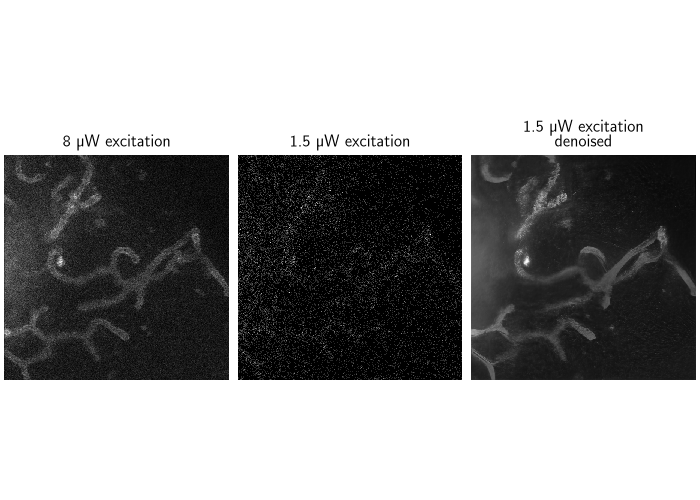
Acquiring fluorescence microscopy images at low excitation laser power reduces photobleaching and phototoxicity, which lets biologists image living samples for longer, but it produces noisier images. Here we recover clean images from acquisitions taken at 1.5 microwatt excitation, using images taken at 8 microwatt as the ground truth.
This example requires tifffile, rarfile and napari. Install them with
pip install tifffile rarfile "napari[all]".
import deepinv as dinv
import torch

device = dinv.utils.get_device()
Selected GPU 0 with 11218.4375 MiB free memory
Download the dataset#
We download the live-cell mitochondria STED dataset from Zenodo. The dataset includes the low-intensity acquisitions (1.5 microwatt) as well as a reference high-intensity (8 microwatt) ground truth, which we use for visualisation.
data_dir = dinv.utils.get_cache_home() / "datasets" / "sted"
archive_name = "live_cell_mitochondria_u2os_tom20_halotag7_dm_sir"

dinv.datasets.download_archive(
    f"https://zenodo.org/records/14215838/files/{archive_name}.rar?download=1",
    data_dir / f"{archive_name}.rar",
    extract=True,
)
File already downloaded: /local/jtachell/.cache/deepinv/datasets/sted/live_cell_mitochondria_u2os_tom20_halotag7_dm_sir.rar. Skipping...
Build the dataset#
We use deepinv.datasets.ImageFolder to pair the ground truth and
low-intensity images. TIFF files are loaded with deepinv.utils.load_tiff().
dataset = dinv.datasets.ImageFolder(
    data_dir / archive_name / "test_and_training_data_1",
    x_path="ground_truth_images/*.tif",
    y_path="low_intensity_images/*.tif",
    loader=lambda f: dinv.utils.load_tiff(f).squeeze(0).float(),
)
Denoise with the RAM foundation model#
deepinv.models.RAM is a pretrained foundation model for image
restoration. We process the data in batches. The gain
argument sets the Poisson noise level used by the model.
model = dinv.models.RAM(device=device)

for x, y in torch.utils.data.DataLoader(
    dataset, batch_size=1
):  # adjust batch size as necessary
    x, y = x.to(device), y.to(device)
    with torch.no_grad():
        rescale = y.max()
        x_net = model(y / rescale, gain=0.15) * rescale

    break  # remove this to process the whole dataset
Visualize the results#
We compare the ground truth, the noisy low-intensity measurement, and the denoised reconstruction.
dinv.utils.plot(
    {
        "8 µW excitation": x,
        "1.5 µW excitation": y,
        "1.5 µW excitation\ndenoised": x_net,
    },
    figsize=(7, 5),
)
Interactive viewer with napari#
Use deepinv.utils.plot_napari() to interactively visualise microscopy images/stacks/volumes
with the napari viewer.
Since it opens an interactive window, it requires a display and is not executed in this gallery. To reproduce the screenshot below, run:
Pass screenshot=True to take a static screenshot instead:

- References:
Total running time of the script: (0 minutes 2.439 seconds)
